Example 1: CBL Reconstruction
This is the first production example and the current canonical end-to-end example in the repository.
It lives in examples/production/cbl_log_example/ and reconstructs the
supported part of a real CBL/VDL report packet using the repo-shipped DLIS
sources below plus a reference PDF for structural comparison:
workspace/data/CBL_Main.dlisworkspace/data/CBL_Repeat.dlisworkspace/renders/CBL_log_example.Pdfas the visual reference
The generated pages are independent wellplot renderings. They preserve the
factual packet structure and well metadata needed for the example without
claiming to be vendor-authored originals.
Use this example when you want one coherent packet that includes:
- a heading page
- a
remarksblock on the first page - multiple log sections
- a layout-defining depth/reference track
- scalar curves, dual-scale CBL, and VDL raster output
- a compact tail page
What the rendered packet looks like
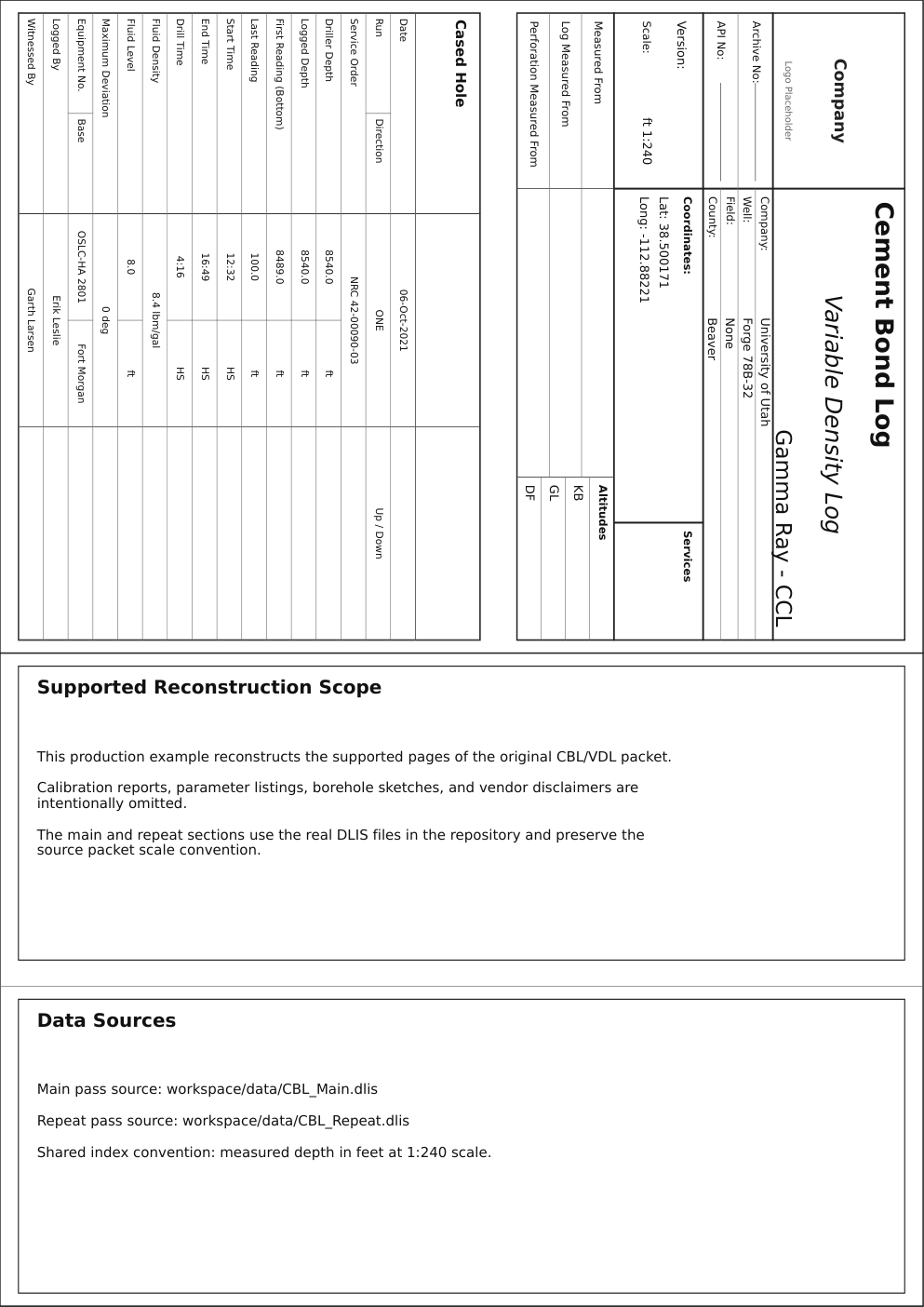
The packet is built from two layers:
base.template.yaml- shared page geometry, report styling, heading data, and tail toggle
full_reconstruction.log.yaml- packet-specific remarks, section definitions, data sources, and bindings
That split is deliberate. Stable packet conventions belong in the template. Section-specific content belongs in the reconstruction file.
Package layout
The example package currently contains:
examples/production/cbl_log_example/README.md- package overview, intended scope, and render commands
examples/production/cbl_log_example/base.template.yaml- shared render defaults, page geometry, heading data, and tail toggle
examples/production/cbl_log_example/full_reconstruction.log.yaml- the full packet reconstruction
examples/production/cbl_log_example/data-notes.md- required source files and assumptions
1. Start with the shared template
base.template.yaml holds the packet-level decisions that should not vary from
section to section.
document:
  depth_range:
    - 100
    - 8489
  page:
    size: A4
    orientation: portrait
    continuous: false
    bottom_track_header_enabled: true
    track_gap_mm: 0
    track_header_height_mm: 30
  depth:
    unit: ft
    scale: 240
    major_step: 10
    minor_step: 2
  layout:
    heading:
      enabled: true
      provider_name: Company
      general_fields:
        - key: company
          label: Company
          value: University of Utah
        - key: well
          label: Well
          value: Forge 78B-32
        - key: scale
          label: Scale
          value: ft 1:240
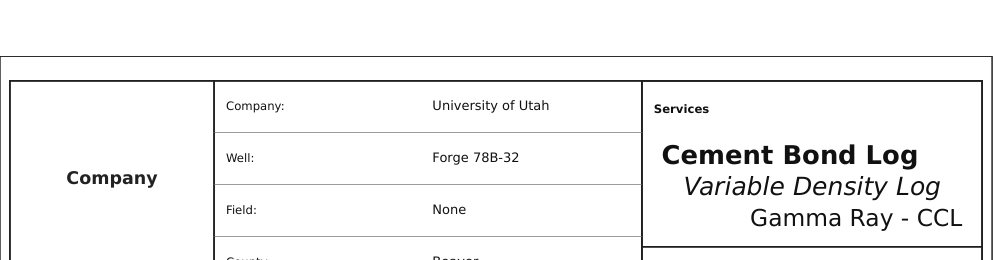
      service_titles:
        - value: Cement Bond Log
          font_size: 16
          auto_adjust: true
          bold: true
          alignment: left
        - value: Variable Density Log
          font_size: 15
          auto_adjust: true
          italic: true
          alignment: center
        - value: Gamma Ray - CCL
          font_size: 14
          auto_adjust: true
          alignment: right
      detail:
        kind: cased_hole
        title: Cased Hole
        rows: ...
    tail:
      enabled: true
This file establishes:
- the page format and scale convention
- the dedicated per-track header band
- the heading packet content
- the service-title formatting
- the fixed-row cased-hole detail table
- the fact that the packet ends with a tail page
Heading
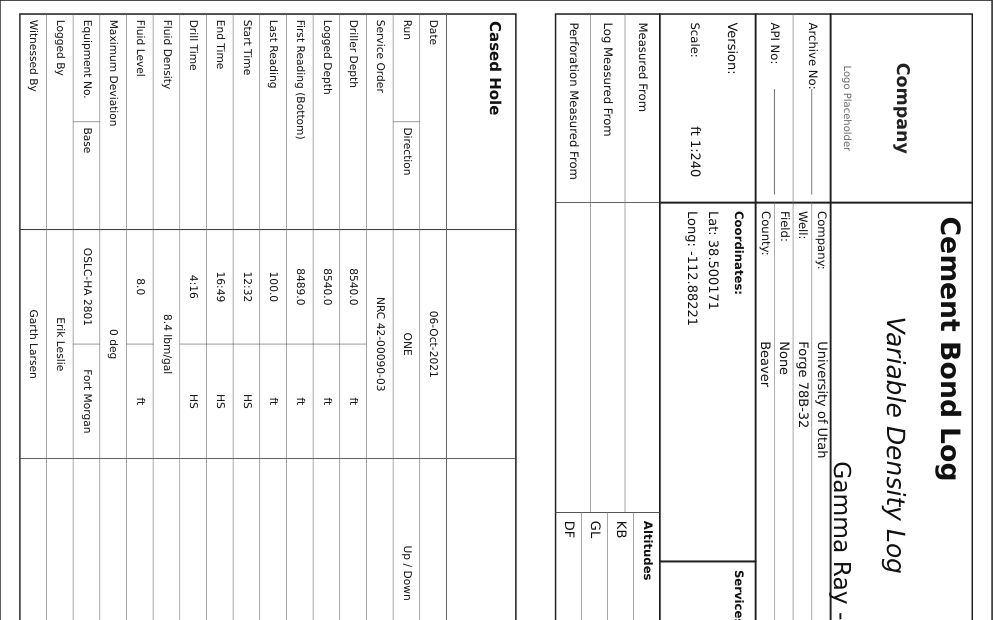
The heading in this example uses the shared report model documented in Report Pages. The important split is:
general_fields- packet identity and operational metadata
service_titles- the large service-name stack on the cover block
detail- the standardized
cased_holefixed-row table
If you are adapting this example for another packet, change these heading fields first before touching the log sections.
2. Add first-page remarks and the public-data notice
remarks belongs in full_reconstruction.log.yaml, because it explains this
specific packet rather than the reusable template.
document:
  layout:
    remarks:
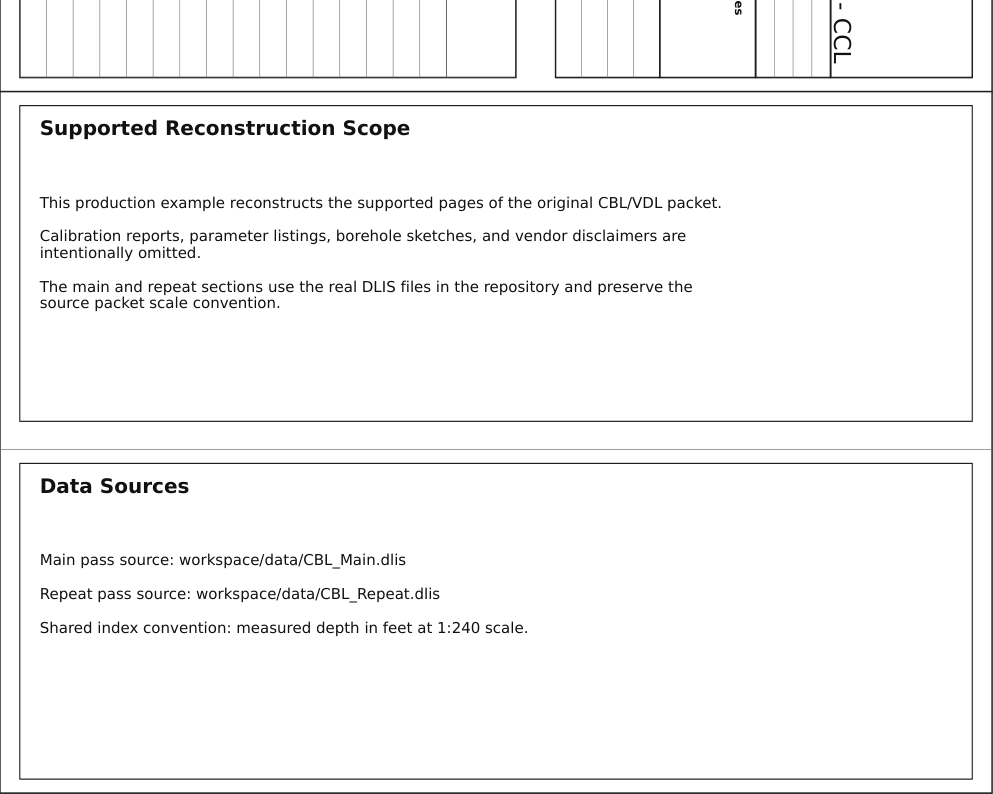
      - title: Supported Reconstruction Scope
        lines:
          - This production example reconstructs the supported pages of the original CBL/VDL packet.
          - Calibration reports, parameter listings, borehole sketches, and vendor disclaimers are intentionally omitted.
          - The main and repeat sections use the real DLIS files in the repository and preserve the source packet scale convention.
        alignment: left
      - title: Data Sources
        lines:
          - "Main pass source: workspace/data/CBL_Main.dlis"
          - "Repeat pass source: workspace/data/CBL_Repeat.dlis"
          - "Shared index convention: measured depth in feet at 1:240 scale."
        alignment: left
      - title: Public Data and IP Notice
        lines:
          - This example uses publicly available or repository-provided demonstration data intended for educational use.
          - Rendered layouts are independent reproductions generated by wellplot, not vendor-authored originals or official service-company deliverables.
          - Original trademarks and service names remain the property of their respective owners.
          - Confirm data provenance and redistribution rights before reusing outputs outside this repository.
        alignment: left
Use remarks for:
- reconstruction scope
- acquisition notes
- public-data and IP notices that apply to the supported packet
- data provenance
Keep packet-wide narrative here. Do not try to encode track-specific logic in the remarks block.
3. Define the log sections
The full reconstruction defines two sections:
main_passrepeat_pass
Each section declares its own data source and track layout.
document:
  layout:
    log_sections:
      - id: main_pass
        title: Main Pass
        subtitle: CBL_Main.dlis
        data:
          source_path: ../../../workspace/data/CBL_Main.dlis
          source_format: dlis
        tracks:
          - id: combo
            kind: normal
            width_mm: 50
          - id: depth
            kind: reference
            width_mm: 36
            reference:
              axis: depth
              define_layout: true
              unit: ft
              scale_ratio: 240
          - id: cbl
            kind: normal
            width_mm: 44
          - id: vdl
            kind: array
            width_mm: 48
            x_scale:
              kind: linear
              min: 200
              max: 1200
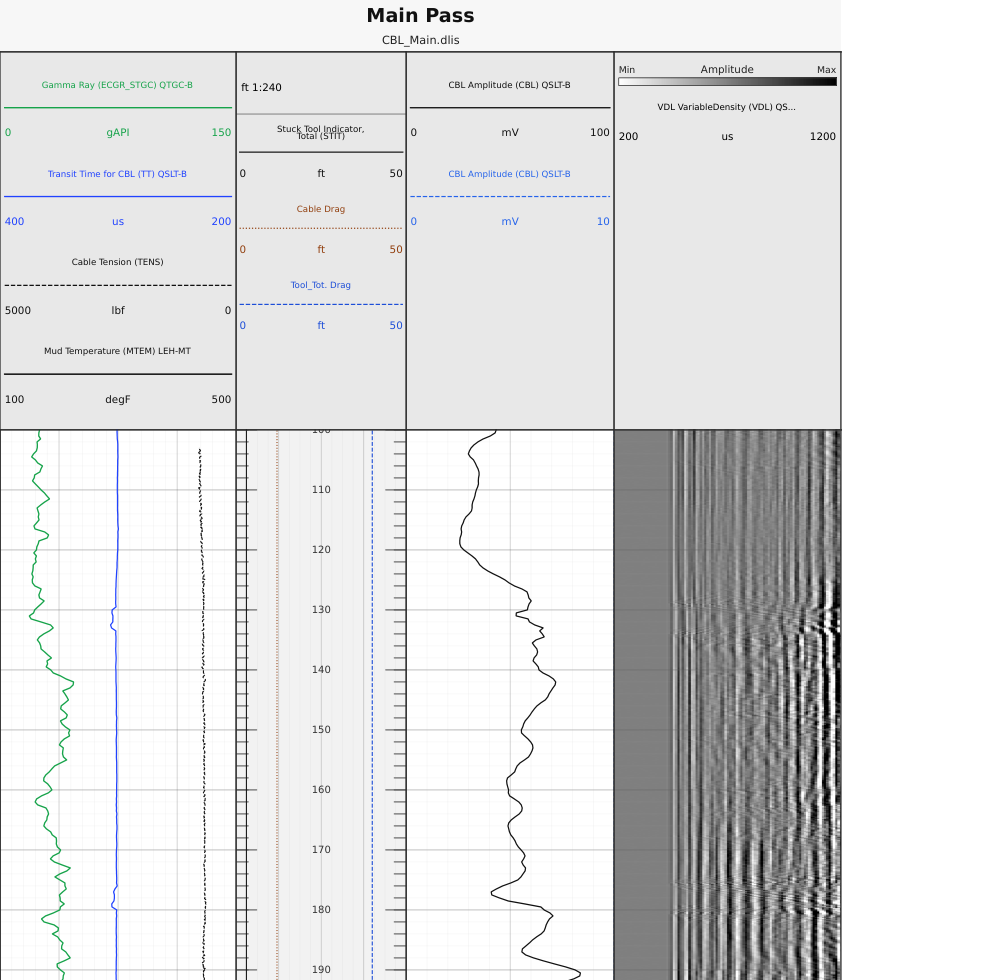
The important rule is that the depth track is the layout-defining axis:
kind: referencereference.define_layout: true
Everything else aligns to that track.
In this example:
combocarries GR, TT, cable tension, and mud temperaturedepthcarries the printed depth scale and reference overlayscblcarries the dual-scale amplitude displayvdlcarries the array/raster display and header color bar
Repeat section with a section-specific interval
The repeat pass uses the same structure, but it only renders the interval that is actually present in the repeat data.
      - id: repeat_pass
        title: Repeat Pass
        subtitle: CBL_Repeat.dlis
        depth_range:
          - 8230
          - 8490
        data:
          source_path: ../../../workspace/data/CBL_Repeat.dlis
          source_format: dlis
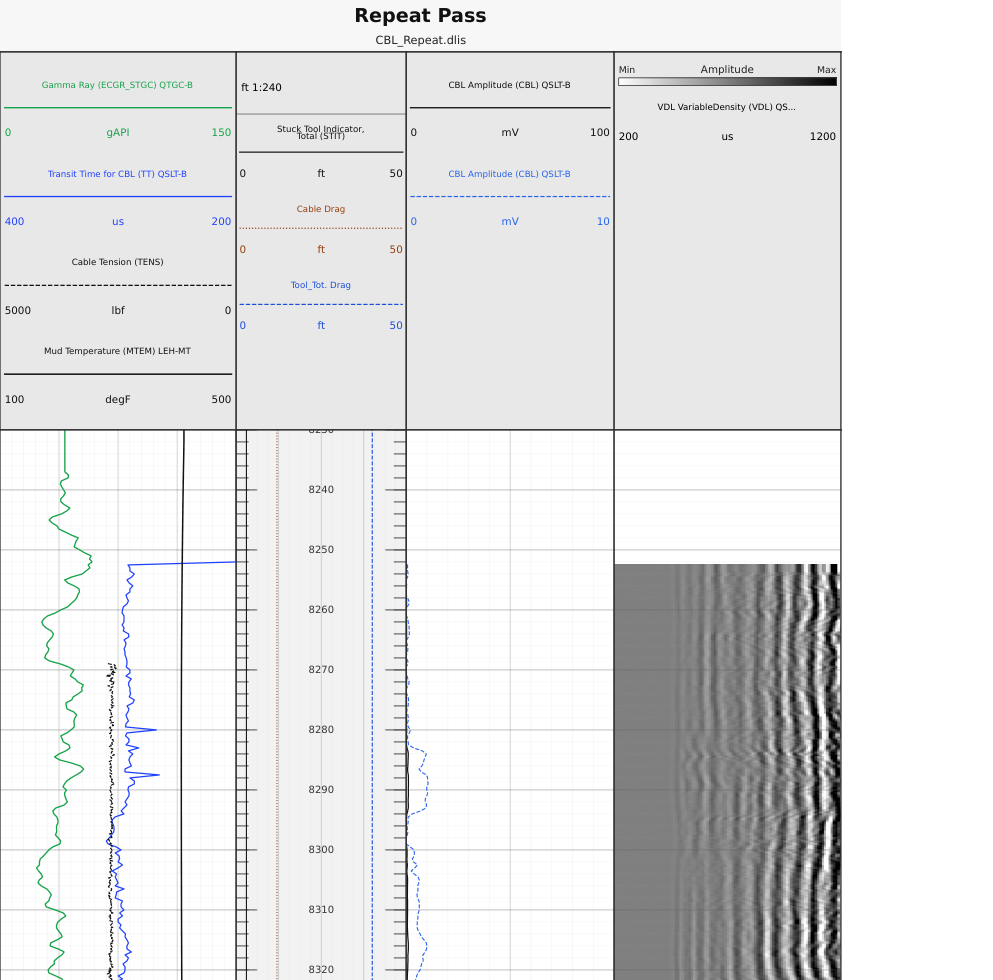
Use section-level depth_range when one section should render a smaller window
than the packet default.
4. Bind channels to tracks
The bindings layer is where the raw channels become visible elements.
This example mixes:
- normal scalar curves
- dual-scale CBL bindings
- VDL raster output
- reference-track overlays
bindings:
  channels:
    - section: main_pass
      channel: CBL
      track_id: cbl
      kind: curve
      id: cbl_0_100_main
      label: CBL Amplitude (CBL) QSLT-B
      scale:
        kind: linear
        min: 0
        max: 100

    - section: main_pass
      channel: CBL
      track_id: cbl
      kind: curve
      id: cbl_0_10_main
      label: CBL Amplitude (CBL) QSLT-B
      style:
        color: "#2563eb"
        line_style: "--"
      scale:
        kind: linear
        min: 0
        max: 10

    - section: main_pass
      channel: VDL
      track_id: vdl
      kind: raster
      label: VDL VariableDensity (VDL) QSLT-B
      profile: vdl
      colorbar:
        enabled: true
        label: Amplitude
        position: header

    - section: main_pass
      channel: STIT
      track_id: depth
      kind: curve
      label: Stuck Tool Indicator, Total (STIT)
      scale:
        kind: linear
        min: 0
        max: 50
      reference_overlay:
        mode: indicator
        lane_start: 0.06
        lane_end: 0.20
Two decisions are worth copying directly:
- the CBL amplitude is bound twice so the header can expose both scales cleanly
- the stuck-tool and drag indicators live on the
depthreference track withreference_overlay, not in a separate layout track
That second point keeps the reference track as the structural axis while still allowing slim operational overlays.
5. Finish with the tail
The tail is not a second report model. It reuses the heading data and prints a compact summary block.
In this example the tail is enabled in the shared template:
document:
  layout:
    tail:
      enabled: true
That is enough because the heading and tail share the same report packet data. See Report Pages for the full report model.
Validate and render
From the repository root:
wellplot validate \
  examples/production/cbl_log_example/full_reconstruction.log.yaml

wellplot render \
  examples/production/cbl_log_example/full_reconstruction.log.yaml
Expected render target:
workspace/renders/CBL_log_example_full_reconstruction.pdf
Adapt this example safely
When you copy this example for your own packet, use this order:
- Update
base.template.yaml - company, well, service titles, detail table, scale text
- Update
full_reconstruction.log.yaml - remarks, section titles, data paths, depth windows
- Keep the layout contract stable
- one
referencedepth track withdefine_layout: true - Adjust bindings only after the tracks are settled
- curves, raster elements, overlay lanes, fills, callouts
- Validate before render
- catch schema problems before spending time on visual tuning
Why this is example 1
This example is the strongest current reference for how the main document sections fit together:
- heading
- remarks
- log sections
- bindings
- tail
Future production examples can be narrower and more specialized. This one remains the packet-level baseline.